Emily
Emily

marketing touches dozens of channels — email, PPC, social media, content, website visits, chatbots — keeping track of prospect behaviour, nurturing leads, and proving ROI can feel chaotic. That’s where a Marketing CRM (Customer Relationship Management) system comes in.
At Elcap, we’ve helped multiple B2B and growth-oriented clients harness this technology — transforming scattered data into clear journeys, manual workflows into automation, and blind spots into measurable growth.
This article will cover:
- What a Marketing CRM is (and what it’s not)
- Core capabilities that drive value
- Real use cases & examples (including our own client work)
- How to choose & implement one well
- Common challenges & how to avoid them
What is a CRM?
A Marketing CRM is a system built to help marketing teams understand, manage, and act on customer/prospect data across all touchpoints, not just sales. Key differentiators vs general sales CRMs:
|
Feature |
What Most sales CRMs Do |
What a Marketing CRM Adds / Emphasises |
|
Contact records, deal pipelines |
✅ |
✅ |
|
Customer/lead history of purchases or deals |
✅ |
✅ |
|
Behaviour tracking (page views, email opens, clicks, ad interactions) |
Sometimes |
Always / deeply integrated |
|
Segmentation based on demographics + behaviour |
Limited |
Rich & dynamic |
|
Automation of nurture journeys, drip campaigns |
Rarely |
Core feature |
|
Attribution & analytics for marketing activity |
Often clunky or post-hoc |
Built in, real-time dashboards |
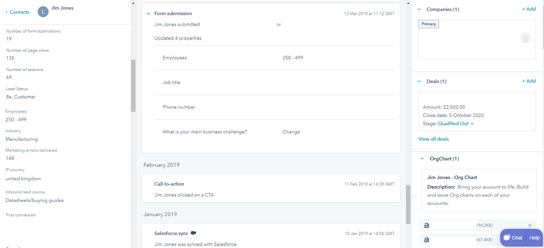
Image: a live CRM (HubSpot) - drill down into a single record or view trends through analytics.
2. Core Capabilities You Should Expect
Here are capabilities that make a Marketing CRM really deliver:
- Multi-channel tracking: website visits, form submissions, ad clicks, email engagement, content downloads, chat / live support.
- Lead scoring & segmentation: automatically ranking leads by readiness or behaviour; dynamic segments that update.
- Marketing automation & nurture workflows: drip campaigns, onboarding sequences, follow-ups triggered by behaviour.
- Analytics & dashboards: real-time views into funnel performance; attribution models; conversion bottlenecks.
- Personalisation & content journey mapping: showing different content depending on where someone is in their journey.
- Integrations: between your CRM, your website/CMS, ad platforms, email tools, possibly chatbots, payment or invoicing systems.
- Data hygiene & governance: duplication removal, consent / privacy compliance, consistent tagging, clean fields.
3. Why Adopt a Marketing CRM? Key Benefits
Here are some of the top reasons companies implement a Marketing CRM:
- Connect marketing activity to measurable revenue
You stop doing blind marketing and start seeing which campaigns bring real sales or qualified leads. Elcap clients using HubSpot (for example) have been able to see which ad, which email or which content path is driving actual opportunities. - Speed up lead nurturing / shorter sales cycles
By automating follow-ups triggered by behaviour (downloads, website engagement, etc.), leads don’t fall through the cracks. For instance, one client who had stalled enquiry forms now gets automated follow-ups, reducing average time from enquiry to meeting booked by 40%. - Personalised customer journeys
With segmentation and behavioural triggers, you can send relevant messages (e.g. content, special offers) according to where a user is in their journey. This improves engagement, conversion and customer satisfaction. - Scale without scaling headcount
Once workflows and automation are set up, many tasks that used to require multiple team members can be handled by the CRM. This allows smaller teams to punch above their weight. - Data-driven decision making
Rather than guessing, you can see which channels are underperforming, which content resonates, and adjust strategy accordingly. One Elcap client found that certain PPC campaigns had high click volume but poor conversion; switching budget to content + remarketing improved ROI by over 25%.
what to expect when implementing a marketing crm
Implementing a marketing CRM isn’t like planting magic beans. It won’t instantly solve your marketing problems or generate leads out of thin air.
It’s more like getting a custom garden plan: you get a setup tailored to your exact conditions — your data, your processes, your audience.
- Setup is specific – HubSpot (or any CRM) gives you the right tools for your environment, but they need proper configuration.
- Care is required – if your team doesn’t adopt the workflows, nurture campaigns, and dashboards, the setup won’t deliver.
- Attention pays off – with consistent use, optimisation, and follow-up, you start to see growth and results. Neglect it, and it underperforms — just like a garden left untended.
Brutal truth: the CRM exposes your weak spots. It won’t fix them for you. But with attention and care, it becomes a system that actually works.
5. How to Choose the Right Marketing CRM for Your Business
Here are criteria & a checklist to help you make the right choice:
|
Criteria |
What to Look For |
|
Ease of use / team adoption |
Intuitive UI; good onboarding & documentation; training resources. |
|
Scalability |
Can handle more contacts, more workflows, more integrations as you grow. |
|
Automation & flexibility |
The ability to build and update workflows; trigger-based actions; conditional logic. |
|
Analytics & attribution |
Dashboard visualisations; can track ROI, conversion rates, funnel metrics; custom reporting. |
|
Integrations |
CMS, ad platforms (Google Ads, LinkedIn, etc.), email tools, form tools, maybe chatbots, CRMs (if separate). |
|
Support & community |
Vendor support, community forums, partner or agency support (like Elcap). |
|
Pricing & cost structure |
Upfront costs, ongoing licensing, onboarding, training, additional user fees, etc. |
6. How to Implement a Marketing CRM Successfully
Implementation is where the value is delivered, or lost. Here’s a recommended path:
|
Tool |
Best For |
Key Strengths |
Limitations |
|
HubSpot Marketing Hub |
Small–mid teams or scale-ups |
All-in-one platform combining CRM, CMS, and automation. Excellent UX, reporting, and integration depth. |
Can become costly as contacts scale. |
|
Salesforce Marketing Cloud / Pardot |
Enterprise organisations |
Deep integration with sales CRM; strong automation and segmentation; built for complex, multi-brand setups. |
Heavy setup; requires admin resources. |
|
Marketo Engage (Adobe) |
Mid–large B2B firms |
Robust automation, lead scoring, and analytics. Great for long, complex funnels. |
Steep learning curve; less intuitive than HubSpot. |
|
ActiveCampaign |
Growing SMBs |
Affordable entry point with solid automation and email marketing. |
Limited scalability and reporting depth. |
|
Klaviyo |
Ecommerce brands |
Excellent ecommerce integrations (Shopify, WooCommerce); strong segmentation and personalised messaging. |
Less suited to service or B2B use cases. |
|
Zoho CRM |
Small businesses |
Budget-friendly all-rounder; flexible modules. |
Interface and automation less refined than higher-end tools. |
7. Common Pitfalls & How to Avoid Them
- Audit & plan
Understand existing systems (where data lives, forms, touchpoints), map your customer journey, identify key gaps. - Define goals & KPIs
What matters: number of qualified leads, conversion rates between stages, channel ROI, average time to close, churn, etc. - Clean & migrate data
Ensure the data entering the new system is clean (duplicates removed, fields standardised, GDPR/consent compliant). - Set up tracking & integrations
Website, ad accounts, forms, email, social… every touchpoint should feed into the CRM correctly. - Build workflows & automated nurturing
Map out lead journeys, automate follow-ups, triggers, scoring. - Training & adoption
Ensure your team knows how to use the system; document processes; assign ownership. - Continuous review & iteration
Monitor dashboards; identify bottlenecks; adjust scoring; prune unused workflows; refine messaging.
|
Pitfall |
Why It Happens |
How to Avoid |
|
Over-customisation too early |
Trying to build every possible workflow before you’ve even validated what works |
Start simple; build basic segments & journeys; expand gradually |
|
Poor data hygiene |
Duplicate records, missing fields, inconsistent tags, missing consent |
Establish governance of data; regular clean-ups; audits |
|
Ignoring integration |
If your CRM isn’t well connected to other systems, you lose visibility |
Prioritize integrations early; test well; monitor data flows |
|
Low adoption |
Team resists or doesn’ttuse it fully |
Invest in training; designate owners; show early wins; document workflow and best practices |
|
Underestimating ongoing cost |
Licenses + additional features + agency/time costs + maintenance |
Budget not just for license but training, maintenance, optimisation; plan for scale |
Why should you adopt a CRM?
The main benefit of implementing a CRM is business growth. It's easy to scale, manage opportunities and put marketing at the centre of the customer experience with a CRM.
However, a well-implemented, fully functioning CRM will improve a balanced scorecard of business metrics:
|
Maximise market opportunity |
Data mining, SEO analysis, personas |
No. of opportunities |
|
Deal velocity |
Conversion rate at each stage to accelerate time to order. ‘Fail fast’ mentality. Accelerate sales journey. |
RFV (recency, frequency value) |
|
Business intelligence |
Competitive positioning, lead score |
Forecasting |
|
Revenue |
Churn rate, AOV |
Profit, growth, market share |
|
Customer Happiness |
Growth of Net Promoter Score |
Time to value, Opportunity, £ value |
From a marketing perspective, the CRM provides the ability to systematically capture, nurture, automate and report. Scale without having to increase the headcount of your team.
What tools are available?
There are many CRM tools available on the market.
The most common CRM tools are:
- HubSpot
- Pardot (Salesforce)
- Marketo
- Infusionsoft (for small businesses)
- Monday.com
What is the cost of a CRM?
The cost of a CRM will vary based on the size of your business, features, maturity of system etc.
As a rule of thumb, businesses expect to spend approximately 3% of their revenue on technology systems, and approximately 10-30% of the technology budget should be allocated to a CRM.
As a CRM matures, it will eventually be used by (almost) everyone in the business, as a crucial tool to deliver rich insights and improve customer experience.
How to implement a CRM?
Implementing a CRM shouldn't be a one-off project. It's a living, breathing tool which needs to evolve with your business. This means you will either need to employ someone to manage your CRM and marketing automation, or outsource it to an agency like elcap.
Elcap manage a range of CRMs for our customers. For example, we are a HubSpot partner, which means that we manage the data, marketing, websites, automation, workflows, dashboard set ups, integrations etc. on behalf of our clients.
How long does it take to implement a CRM?
Before just buying an annual license to a tool and getting set up, it helps to plan your CRM for optimum scalability. One of the biggest mistakes when implementing a CRM is not planning for long-term. There's going to be a natural evolution of your CRM as adoption of the tool matures, so process, documentation and data capture strategy are key.
Elcap can work with you to plan, implement and manage your CRM properly. We can get you set up in days, but will also show you how to make sure that your tool continues to work.
Get in touch?
elcap implement and manage CRM systems for a number of our clients. If you are considering investing in a CRM get in touch with our team to discuss your opportunities.

.png?width=32&height=32&name=Alison%20(1).png)